The 2-Minute Ooty E-Pass Guide
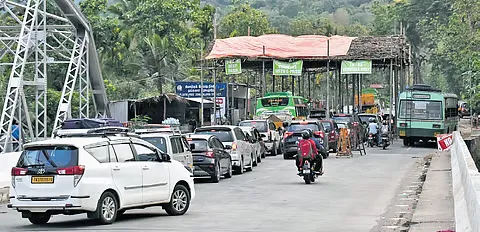
Planning a weekend road trip to the Nilgiris? An E-Pass is legally mandatory for all outstation vehicles entering the district limits (Ooty, Coonoor, Kotagiri). Instated by court order to regulate traffic, it helps prevent bottlenecks on narrow ghat paths.
⚡ Quick Facts: 30-Second Summary
Why is the E-Pass Required?
Following directives from the Hon. Madras High Court, the local administration introduced the digital E-Pass system to solve mounting urban and environmental pressures in the Nilgiris:
Traffic Management
Regulates vehicular peaks during weekend tourist hours to mitigate heavy gridlocks on narrow ghat curves.
Carrying Capacity
Monitors total visitor count to balance the water, power, and road load on mountain municipalities.
Eco Protection
Limits noise and gas emissions inside protected reserve forest corridors surrounding the district borders.
Tourism Planning
Collects tourist entry statistics to plan public services and border administration safety details.
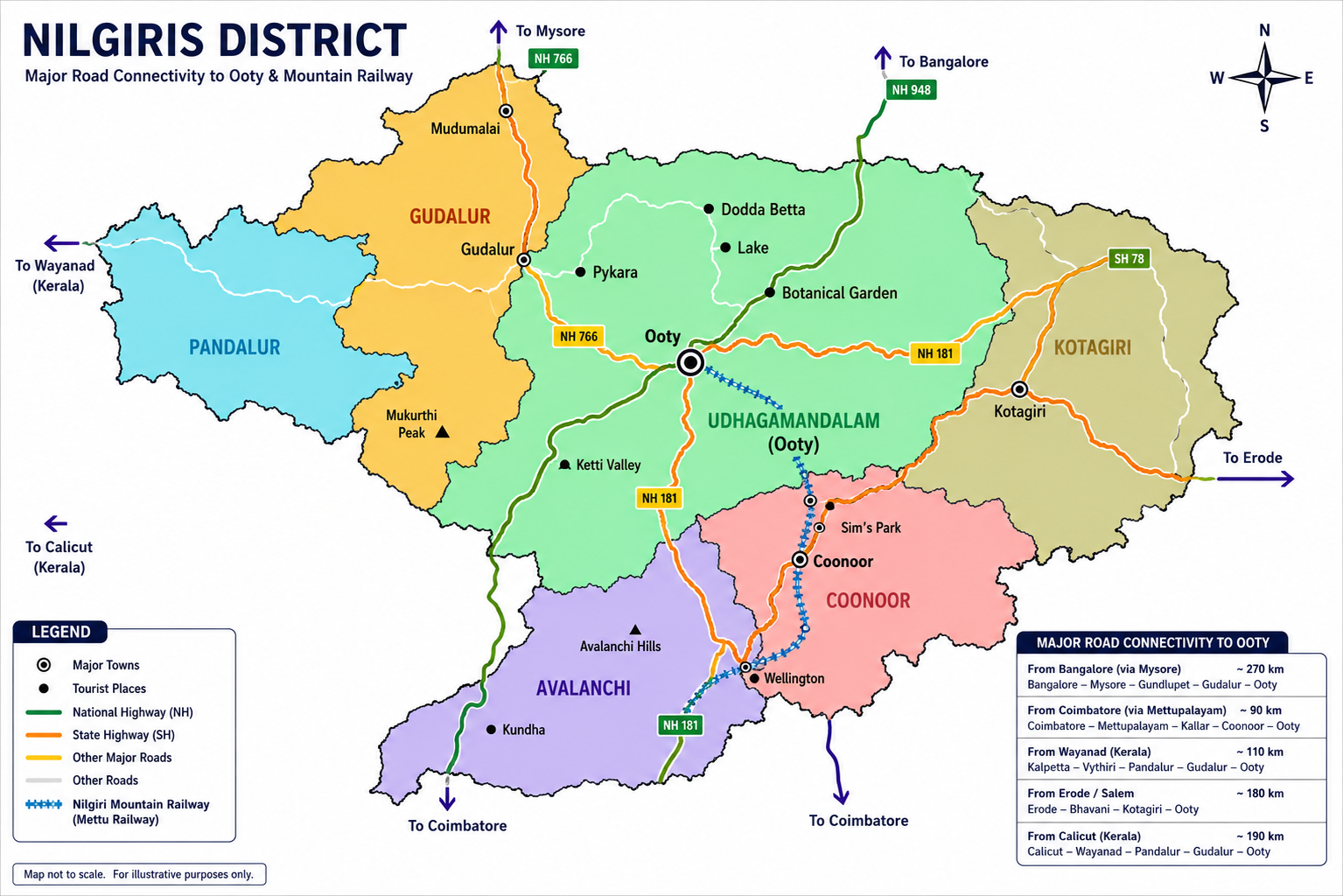
Representative Map of Nilgiris
Familiarize yourself with the key towns, connector highways, and entry points. Checkposts are active at all district boundaries.
How to Apply (Step-by-Step)
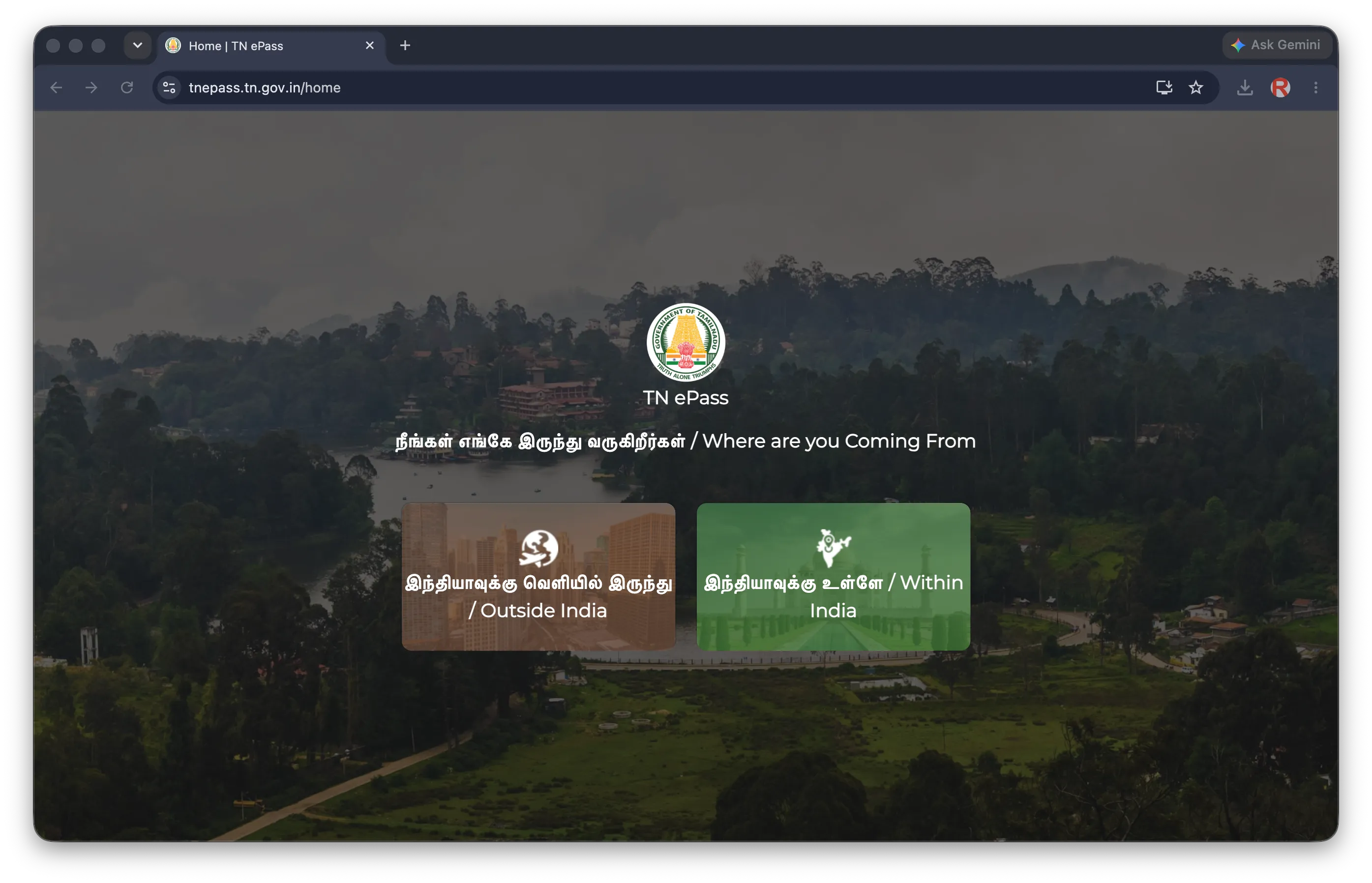
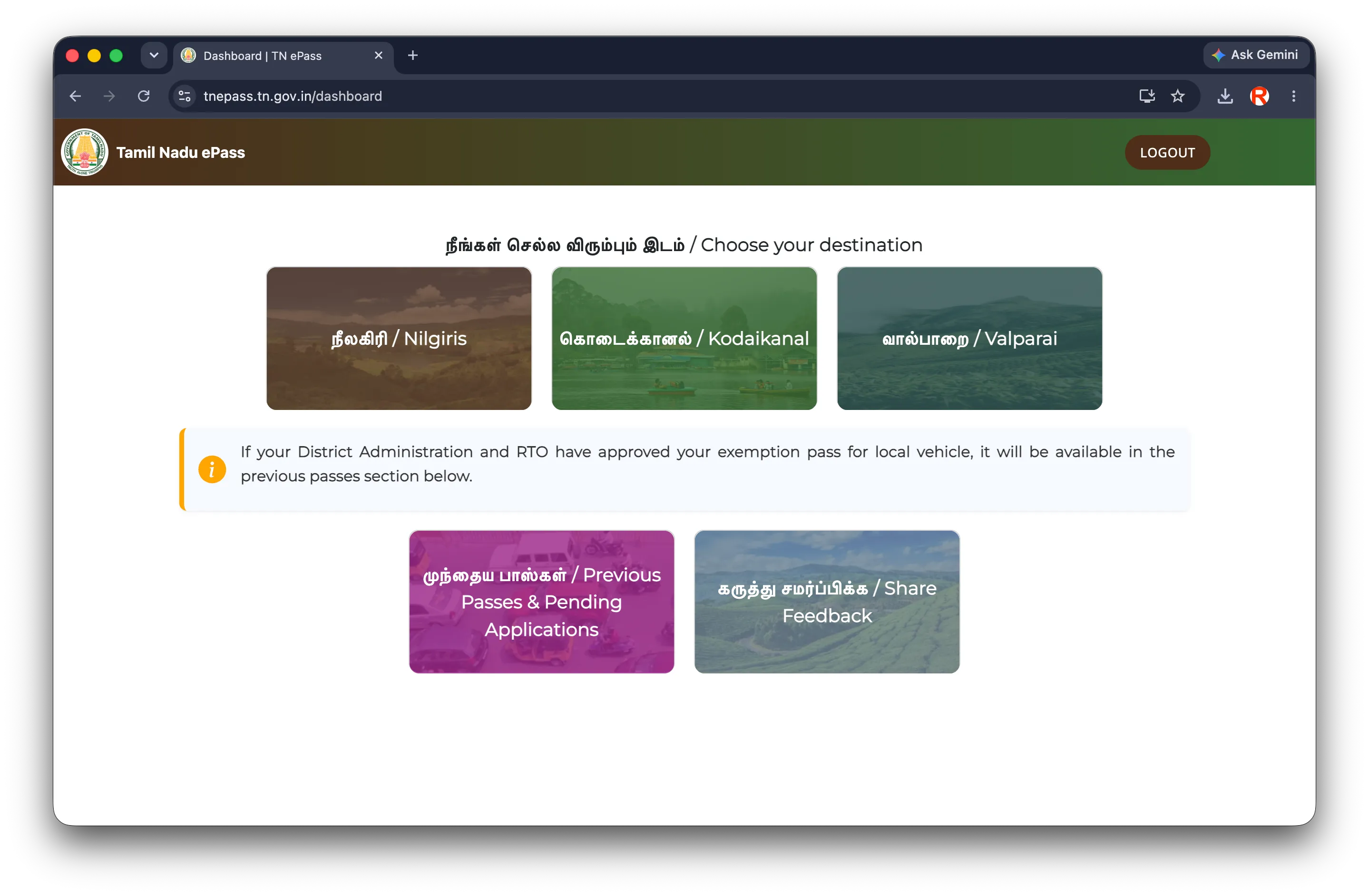
Navigate to the official portal. Click the appropriate tourist class box. Outside India residents select "Foreign Tourist".
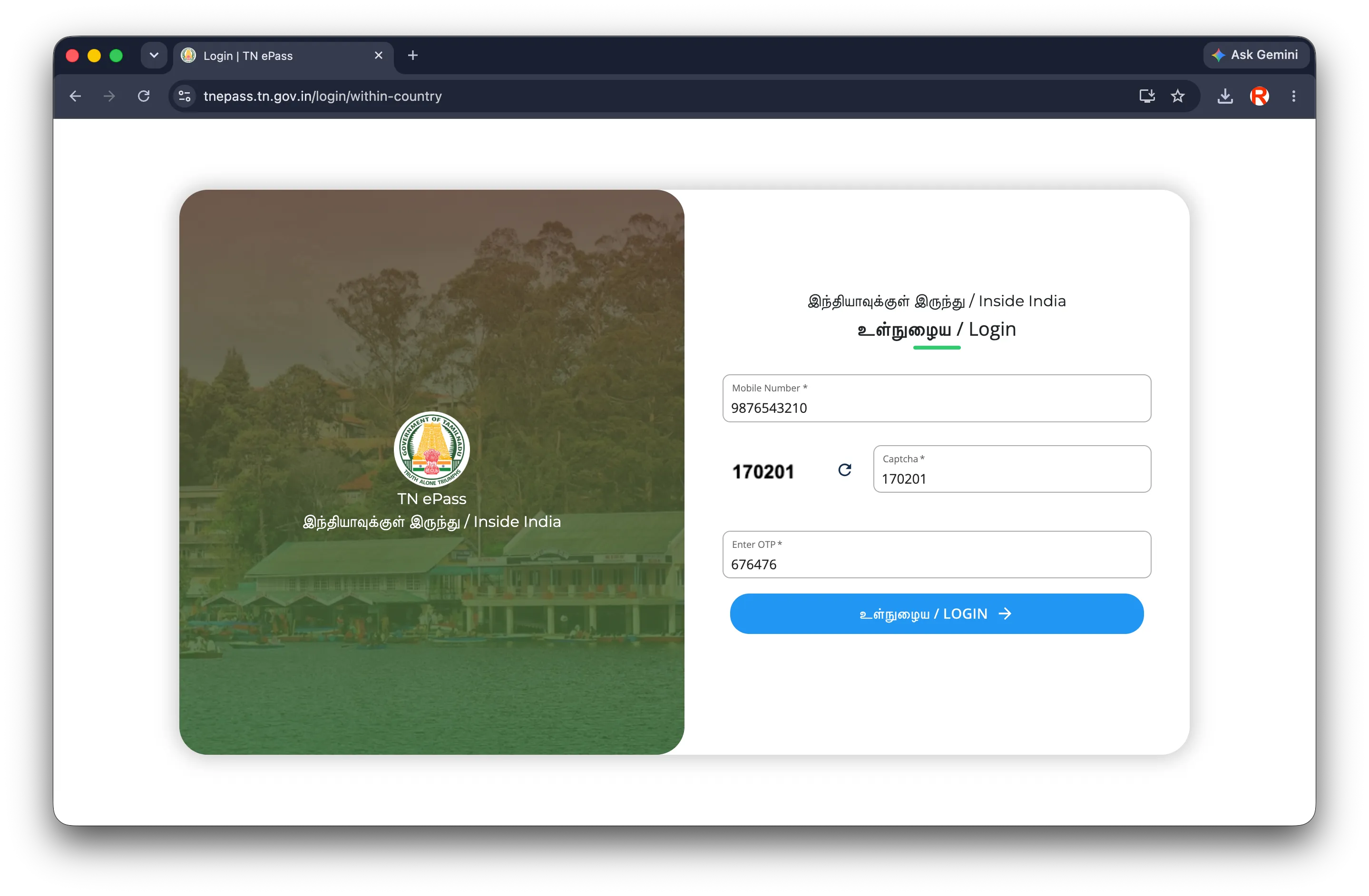
Provide your mobile number. Enter the 6-digit SMS OTP instantly to access the secure form dashboard.
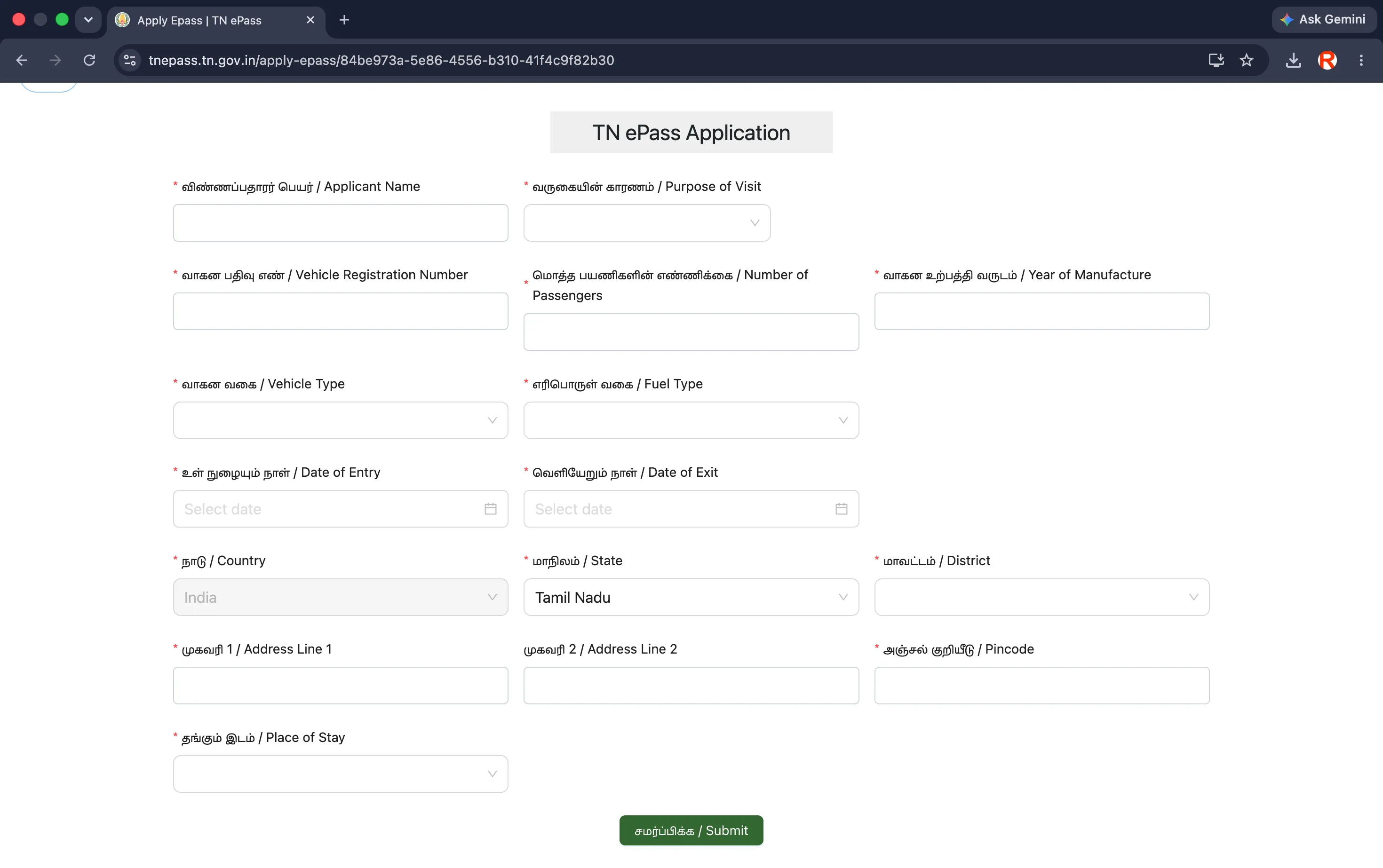
Input your vehicle class, registration number, number of passengers, travel dates, and hotel stay address.
The system generates your E-Pass PDF immediately. Save it on your device and take a screenshot of the QR code.
Application Portal Walkthrough
Refer to these official screenshot steps to ensure you are entering details on the correct page.
Before You Start Your Journey
Generate E-Pass
Register on the portal 1-2 days before the climb.
Download PDF
Save the E-Pass document directly to your device storage.
Screenshot QR
Keep a photo of the QR code in your gallery for offline use.
Charge Phone
Checkposts are in remote valleys with no charging points.
Driving Licence
Keep the driver's original physical license ready.
Vehicle RC
Keep vehicle registration card details in the glovebox.
Hotel Booking
Have stay addresses and phone contacts accessible.
Cash / UPI
Keep cash ready for boundary Green Tax payments.
Where is the E-Pass Checked?
The exact checkpoint depends on the direction you approach the Nilgiris. Active checks are conducted at:
*Note: Our dedicated route pages outline the specific checkpoint layouts and inspection workflows for each highway approach separately.
💡 Local Tip: Beat the Border Queues
Border checkpost lines swell heavily after 9:30 AM on weekends and holiday seasons. **We strongly recommend aiming to cross checkposts before 9:00 AM.** If driving during peak seasons (such as May/summer or December), crossing between **6:00 AM and 8:00 AM** is ideal. Doing so saves you up to two hours of waiting in vehicle queues.
Checkpost Requirements & Green Tax
Officers at the checkpoints conduct three primary clearances before allowing outstation vehicles to enter:
1. E-Pass Verification
Scanning the QR code on your PDF or mobile screenshot. Officers ensure the registration plate matches the pass.
2. Green Tax Payment
A separate eco-tax slab collected at the checkpost booth for all outstation private vehicles. Keep cash or UPI ready.
3. Document Check
Random inspections of the driving license, registration plate cards, pollution checks, and hotel booking voucher.
Environmental Rules: Strict Plastic Ban
The Nilgiris is a highly sensitive biosphere. Single-use plastic is strictly banned. Border checkpoint officers conduct thorough visual inspections of tourist luggage and car interiors:
- Thin plastic carry bags of any size.
- Packaged mineral water bottles under 5 liters.
- Disposable plastic plates, cups, spoons, or straws.
- Non-biodegradable food wrapping films.
- Stainless steel or heavy reusable water flasks.
- Reusable cotton cloth or jute bags.
- Reusable metal tiffin boxes for food storage.
- Reusable paper or organic wrapping.
Common Portal Issues & Solutions
OTP Not Received via SMS↓
Calendar disabled / Future dates unavailable↓
Entered Wrong Vehicle Registration Plate↓
Poor Mobile Signal at Border Gate↓
Lost PDF / Forgot to Download↓
First-Time Visitor Checklist
Actionable checklist items to complete before crossing the district gates.
Frequently Asked Questions
Comprehensive answers to clear up all your E-Pass queries.
Category: Basics
Is the Ooty E-Pass mandatory?
Yes, the E-Pass is legally mandatory for all non-TN-43 (outside Nilgiris) vehicles entering the district. This is strictly enforced by police at all border checkpoints.
Is the E-Pass free?
Yes, generating the official Nilgiris E-Pass is 100% free. You should only apply through the official TNeGA portal. Avoid third-party websites charging fees.
Who needs to apply for the E-Pass?
All private cars, commercial cabs, tourist buses, motorcycles, and out-of-state vehicles entering the Nilgiris must register. Only local residents are exempt.
Who is exempt from the E-Pass?
Local vehicles registered in the Nilgiris district with the RTO plate code TN-43 are fully exempt. Government vehicles and emergency services are also exempt.
Do motorcycles need an E-Pass?
Yes. All outstation two-wheelers entering the Nilgiris are required to register for the E-Pass. Note that tourist bikes are restricted from the steep Masinagudi ghat climb.
Are rental cars (self-drive) included?
Yes. If the rental car has commercial plates (yellow board) or standard private plates but is registered outside the Nilgiris, you must apply for an E-Pass.
Category: Applying
How long does approval take?
Approval is instant and automatic. The moment you fill out the online form and click submit, the scannable PDF pass is generated.
Can I apply on the same day?
Yes, you can apply on the day of travel. However, because network signals are extremely weak near the border checkpoints, do not wait until you reach the gate.
How early should I apply?
It is ideal to apply 1–2 days before your journey. This ensures that you have the downloaded PDF and screenshot saved on your phone well in advance.
What documents are required?
You do not need to upload files. You only need to type in your vehicle registration number, passenger count, entry/exit dates, hotel address, and driver's ID number.
Can I edit the E-Pass later?
No, generated passes cannot be edited. If you made a mistake (like entering the wrong registration plate), simply apply for a new free pass on the portal.
Category: Border & Gate
Where is the E-Pass checked?
It is checked at the entry checkposts on all roads climbing the Nilgiris (e.g., Kallar, Kakkanalla, Nadugani, Kunjappanai) by checking officers.
What documents should I show at the checkpost?
Show your scannable E-Pass QR code, driving license, vehicle registration certificate (RC), and hotel booking invoice.
Is showing the PDF on mobile enough?
Yes, showing the PDF or a clear screenshot of the QR code on your mobile screen is fully acceptable for checkpoint clearance.
Should I carry a physical printout?
While mobile screens are allowed, carrying a physical printout of the pass and placing it on your dashboard helps speed up checkpoint queues significantly.
What happens if I arrive without one?
Border police will pull you over. You will be forced to apply on the spot on your mobile phone before entry is allowed, causing delays.
Category: Vehicle Details
Do I need a separate pass per person or per vehicle?
It is per vehicle. You only need one E-Pass for your car or bike. The pass includes a declaration of the total passenger count.
What if I enter the wrong registration number?
A wrong registration number makes the pass invalid. Since passes are free, log back into the portal and create a new pass with the correct plate details.
Can a different driver drive the vehicle?
Yes, as long as the driver holds a valid driving license. The name on the pass does not strictly lock the driver, but the vehicle details must match.